PXSourceList

PXSourceList is a Source List control for use in Mac OS X applications targeting the 10.5 SDK or higher.

Latest releases and release notes can be found on the PXSourceList GitHub page; PXSourceList is released under the New BSD License.

What is this?

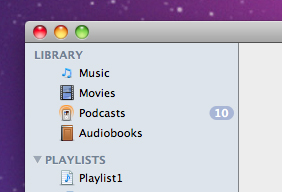
A Source List is a user interface element commonly found among Mac OS X applications, and used in such applications as iTunes and iCal, as a way of navigation. It is commonly distinguished by having a blue background, and top-level items (or “Groups”) displayed capitalized in a dark blue colour. For more information, see the Apple Human Interface Guidelines, which provides extra details.

Unfortunately, the implementation of Source Lists in Cocoa isn’t done particularly well – the only option is to create an NSOutlineView and set Source List highlighting, but other Source List features are not built-in out of the box. As of this I set about creating a Source List control to fill this gap.

I have added functionality for several features common of Source Lists, mainly:

  • Group highlighting for top-level rows in the Source List, like iTunes and the Finder do.
  • Support for Badges – these are the dark blue capsules that are displayed with a number in them in Source Lists (for example in iTunes or iCal).
  • The option to display an icon for each row in the Source List (except Group rows). These are small (usually about 16×16) images that accompany each row to provide extra visual information for each row.

How the Source List works

PXSourceList works in much the same way as an NSTableView or NSOutlineView, in that it uses a data source to obtain the data to display, and a delegate to send messages to when things happen, or to ask about properties of the Source List as a way of customization. The implementation of both is very similar to that of an NSOutlineView, the main difference is the delegate and data source method names, along with extra methods, documentation for which can be found in the PXSourceList documentation.

Using the code

1. Download the Source

Download the source from GitHub, and copy PXSourceList.h, PXSourceList.m, PXSourceListDelegate.h and PXSourceListDataSource.h into your Xcode project.

2. Add the control to your interface

To create the control in Interface Builder, drag an NSOutlineView from the Library onto the desired window.

Select the Outline View and change the class to PXSourceList in the Identity Inspector.

In the Attributes Inspector, set the Source List to have 1 column, uncheck “Headers” in the “Columns” section and set “Highlight” to “Source List”. You can also change whether you allow an Empty or Multiple selection (the Source List is compatible with both) too.

You can connect up the delegate and dataSource outlets here too, or set them in code if you prefer.

3. Working with the Source List

Make sure to #import "PXSourceList.h" for files that require it. The PXSourceListDelegate and PXSourceListDataSource protocol headers are imported from this main header. You must also ensure that the delegate and dataSource for the Source List conform to the PXSourceListDelegate and PXSourceListDataSource protocols respectively.

Note: If you are using PXSourceList in a project that is using the 10.5 SDK, you will need to remove the protocols that PXSourceList conforms to, as these are not present in the 10.5 version of the SDK. In PXSourceList.h, remove the <NSOutlineViewDelegate, NSOutlineViewDataSource> from the interface declaration.

Documentation

Documentation is available for PXSourceList. Provided in the ZIP file is an HTML version of the documentation, and a docset which can be opened in Xcode and is then searchable from the Developer Documentation.

Note: the documentation for the Source List notifications can be found in the NSObject(PXSourceListNotifications) reference, which is linked to from the documentation index page.

Other problems

Hopefully this page along with the documentation for PXSourceList is enough for you to use the control. If there is something I haven’t documented or you are unsure of then let me know and I’ll be happy to help.

If you have any issues with using PXSourceList then you can log them on the issues page for PXSourceList on GitHub.

What is this?

Stack Overflow and Super User are two Q&A websites I am a member of, for programmers and computer enthusiasts respectively.

The "Flair" shown is simply my stats for both sites. Find out more here

(Click to dismiss)

Flair


6,479
Perspx
11324
434
Perspx
1413
Follow me on Twitter

Tweets